
A/B Testing for Beginners: What to Test First
January 5, 2024 | 8,585 views | 12 min. read time
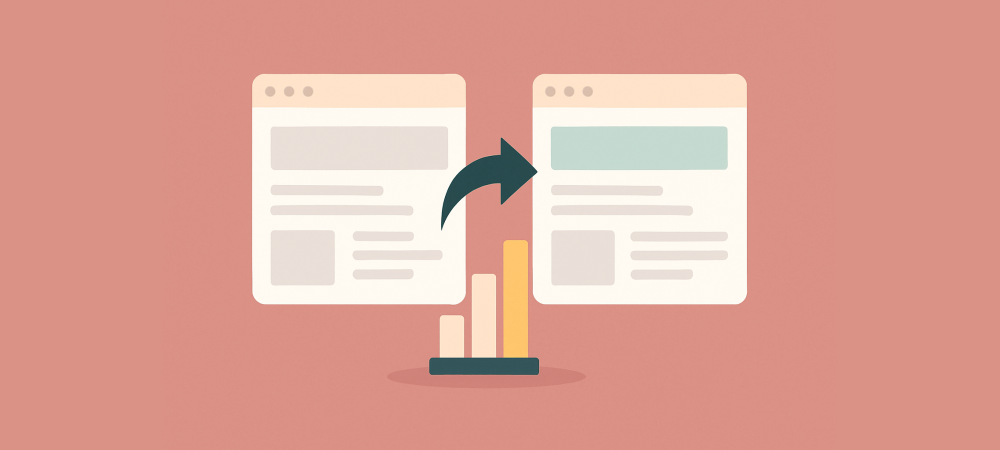
Most website changes are made on gut feeling — someone thinks a new headline or button colour will help, so they change it and hope. A/B testing replaces that guesswork with evidence. By showing two versions of a page to real visitors and measuring which performs better, you learn what actually works for your audience instead of what you assume will. This beginner-friendly guide explains how A/B testing works, what to test first, and how to run tests that give you answers you can trust.
1. What A/B testing is
A/B testing, sometimes called split testing, is a simple experiment. You create two versions of something — version A, the original, and version B, with one change — and show each to a portion of your visitors at random. Then you measure which version drives more of the outcome you care about, such as clicks, sign-ups, or purchases. The version that performs better wins, and you keep it.
The power of A/B testing is that it removes opinion from the equation. Instead of arguing about whether a change is an improvement, you let real customer behaviour decide. Done consistently, it turns your website into something you improve with evidence rather than instinct, one verified change at a time.
2. Why A/B testing matters
Small changes can have surprisingly large effects, and they are almost impossible to predict reliably. A headline you love might underperform a plainer one; a button colour you barely notice might lift clicks. Without testing, you never know which of your changes helped, which hurt, and which did nothing at all.
A/B testing also protects you from expensive mistakes. A redesign that feels better to you could quietly cut conversions, and without a test you might not notice for months. By validating changes against real behaviour before rolling them out fully, you keep the wins and catch the losses early, so your site steadily gets better rather than randomly changing.
3. What to test first
Beginners often waste their first tests on tiny details. Start instead with the elements that most influence whether people act. The highest-impact things to test early are usually:
- Your headline. It is the first thing visitors read and the biggest driver of whether they stay. Testing a clearer or more benefit-led headline often moves the needle most.
- Your call to action. The wording, colour, size, and placement of your main button directly affect clicks, making it one of the most rewarding things to test.
- Your main image or hero. The dominant visual shapes first impressions. Testing a different image, or a real photo versus an illustration, can shift conversions noticeably.
- Your offer or pricing presentation. How you frame the deal — the price, the guarantee, the bonus — strongly influences decisions and is well worth testing.
- Form length and fields. On sign-up or checkout pages, removing a field or shortening a form frequently lifts completion.
Focus your early tests here, on pages with enough traffic to give a clear result, and you will learn more from your first few experiments than from a year of guessing.
4. How to run a test that gives real answers
A valid test follows a few rules. First, change only one thing at a time. If you alter the headline and the button and the image all at once, a difference in results tells you nothing about which change caused it. Isolating a single variable is what makes the outcome meaningful.
Second, run the test long enough on enough visitors. Small numbers produce noisy, unreliable results — a version can look like a clear winner one day and a loser the next simply by chance. Let the test run until it has gathered a solid sample and the difference is statistically meaningful, rather than stopping the moment one version pulls ahead.
Third, decide your goal and success metric before you start. Are you measuring clicks, sign-ups, or completed purchases? Defining the winning condition up front keeps you honest and stops you from reading whatever story you want into the data afterwards.
5. A worked example
Suppose you suspect your product-page button is holding back sales. Version A keeps the current button, labelled “Submit” in a muted grey. Version B changes just the button to a high-contrast colour with the label “Add to Cart.” Everything else on the page stays identical, so any difference in results comes from the button alone.
You split traffic evenly and let the test run for two weeks, by which point several thousand visitors have seen each version. Version A converts at 2.0 percent; version B converts at 2.6 percent. That is a 30 percent relative improvement from one small change, and with a large enough sample you can be confident it is real rather than luck. You roll out version B, and every future visitor benefits.
Crucially, you now also know something about your audience: clarity and contrast on the button matter to them. That insight guides your next test, and testing becomes a compounding habit where each experiment teaches you a little more about what makes your visitors act.
6. Common mistakes to avoid
- Testing too many changes at once. If you change several things together, you cannot tell which one mattered. Isolate one variable per test.
- Stopping too early. Calling a winner after a handful of conversions leads to false conclusions. Wait for a proper sample and a meaningful difference.
- Testing trivial things first. A tiny tweak on a low-traffic page teaches you little. Start with high-impact elements on pages with real traffic.
- Ignoring the result. Running a test and then keeping the version you personally prefer defeats the purpose. Let the data decide.
7. Tools and getting started
You do not need to be technical to start. Many testing and analytics tools handle the mechanics of splitting traffic and measuring results for you, so you can focus on what to test rather than how. Begin with one clear hypothesis on an important page, run a clean test, and act on the outcome.
Above all, treat A/B testing as an ongoing habit rather than a one-off project. Each test answers one question and raises the next, and a steady rhythm of small, validated improvements compounds into a website that converts far better than one changed on guesswork ever could.
Frequently asked questions
What should I A/B test first?
Start with high-impact elements: your headline, your main call to action, your hero image, and your offer. These influence conversions most, so testing them teaches you the most early on.
How long should an A/B test run?
Long enough to gather a solid sample and reach a meaningful difference — often a couple of weeks, depending on your traffic. Avoid stopping early just because one version is temporarily ahead.
Can small sites do A/B testing?
Yes, but low traffic means tests take longer to reach reliable results. Focus on big, high-impact changes on your most-visited pages so the effect is large enough to detect.
Conclusion
A/B testing turns website improvement from guesswork into evidence. Start with the elements that matter most — headlines, calls to action, images, and offers — change one thing at a time, run the test on enough visitors, and let real behaviour decide the winner. Do that consistently, and each experiment both lifts your conversions and teaches you more about your audience, compounding into a site that steadily gets better instead of merely different.
Use FOMO on your website!
Install Proofly in a few clicks to take advantage of FOMO on your website today! No creditcard required.
Get started now!Always be up-to-date with Proofly.
The amount of people using your website on mobile devices rapidly increases. Make sure your websites are fully responsive!
58.447%
Mobile devices
This might be useful for you too:
Are Your Popups Accessible? Screen Readers, Keyboard Traps and the EAA
Popups and notifications are everywhere, but a surprising number of them are unusable for people who navigate with a keyboard or a screen reader — and that is now both an ethical and, increasingly, a legal pro...
2026-04-12
Read more

Social Proof Tactics: 20 Proven Ways to Add Credibility
Credibility is not one big move — it is the sum of many small signals a visitor picks up as they browse. The more genuine proof you stack, the safer they feel to buy from you. This is a practical toolbox of 2...
2022-10-16
Read more

Social Proof for B2B and Lead Generation Sites
B2B is where a lot of social proof advice falls apart. There is no “buy now,” no steady stream of orders, and a sales cycle that runs for weeks or months. But trust matters more in B2B than almost anywhe...
2025-10-24
Read more
Ready to use social-proof too?
You can use Proofly within 5 minutes on your own website absolutely free!
Set-up in 5 minutes Over 25,000 satisfied customers No monthly subscription
4.7/5 customer satisfaction
Get started now!
a few thousand others...